

Typing your name into Google only to find your personal cell phone number, current home address, date of birth, family members, and property history exposed on a public background check website is a major privacy wake-up call. TruthFinder is one of the largest people-search engines in the United States, compiling billions of public and commercial records into searchable dossiers. Because TruthFinder is owned by PeopleConnect (the parent company behind Instant Checkmate, Intelius, and US Search), a single profile does not just stay on one site—it syndicates across multiple directories and feeds aggressive telemarketing dialers.
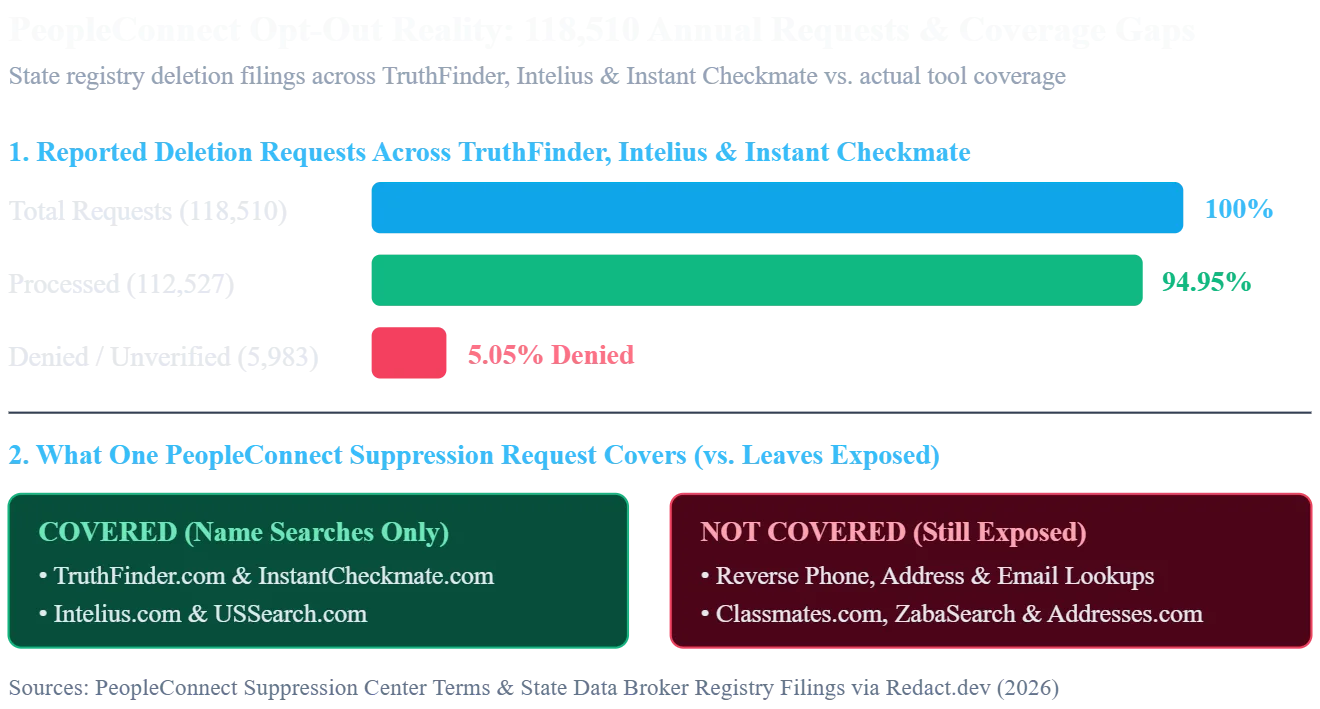
Completing a truthfinder opt out is 100% free and takes 10 to 15 minutes through the official PeopleConnect Suppression Center. However, clicking "Suppressed" is not a complete privacy cure. State data broker registry filings show that out of 118,510 annual deletion requests submitted across TruthFinder, Intelius, and Instant Checkmate, 112,527 (94.95%) were processed while 5,983 requests (5.05%) were denied. Even more concerning, PeopleConnect's own legal terms confirm that suppressing a name search ***does not remove your phone number from reverse-phone or address lookup reports—and it never recalls phone lists already sold to scammers.
Below is the complete 2026 step-by-step guide on how to remove myself from TruthFinder, what suppression actually hides, how long removal takes, and how CallCurb automates your data broker removals while blocking the spam calls that follow your listing.
Quick Summary: Key Takeaways for Your TruthFinder Opt Out (H2)
- Official Free Opt-Out Link: Never pay a subscription fee just to hide your listing. Use the official truthfinder opt out removal link at the PeopleConnect Suppression Center to suppress your profile for free.
- One Submission Covers 4 Major Sites: Setting your profile status to ***"Suppressed" inside PeopleConnect hides your name-search background report across TruthFinder, Instant Checkmate, Intelius, and US Search simultaneously.
- The Reverse-Lookup Loophole: Suppressing your background report only hides your record when someone searches by your first and last name. Under PeopleConnect's terms, your name and mobile number can ***still appear in reverse phone, address, and email lookup reports.
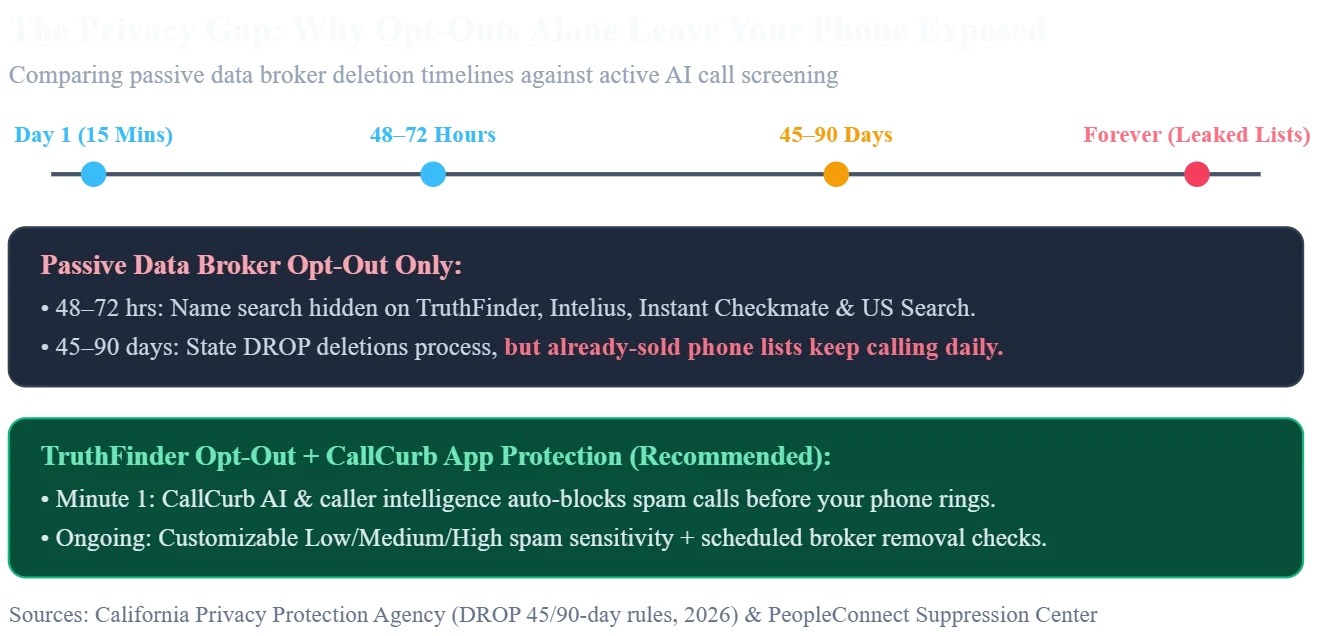
- Exact Removal Timelines: On-site TruthFinder suppression takes 48 to 72 hours, Google search snippet expiration takes 2 to 4 weeks, and statutory state deletions via the California DROP Portal take 45 to 90 days.
- Automated Data Removal + Call Blocking: Because manual opt-outs do not stop telemarketers who already scraped your cell number, CallCurb provides both automated data broker removal and real-time AI spam call blocking on iOS and Android.
Can You Opt Out of TruthFinder for Free in 2026? (H2)
Yes, you can opt out of TruthFinder for free using PeopleConnect's self-service suppression portal without creating a paid membership or entering a credit card. Many consumers searching "can you opt out of truthfinder" are misled by paywalled checkout screens into believing they must buy a $28-per-month subscription just to claim and delete their own background report.
Why TruthFinder Must Provide Free Public Record Suppression (H3)
Federal regulatory action and state privacy mandates forced people-search networks to maintain free opt-out tools:
- FTC $5.8 Million Enforcement Order: The Federal Trade Commission (FTC) ordered TruthFinder, Instant Checkmate, and parent company The Control Group Media Company, LLC to pay $5.8 million for deceiving consumers about background check accuracy and violating the Fair Credit Reporting Act (FCRA).
- State Data Broker Deletion Statutes: Laws such as the California Delete Act (SB 362), Texas Data Broker Law, and Oregon Consumer Privacy Act legally compel data brokers to honor consumer opt-out and suppression requests.
What to Prepare Before Starting the Removal Process (H4)
To make sure your request does not fall into the 5.05% of denied submissions, gather these three essentials before opening the portal:
- A Secondary or Privacy Alias Email: PeopleConnect requires email verification to authenticate your session. Using a dedicated alias email keeps your primary personal inbox out of their verification logs.
- Your 10-Year Address and Name History: Write down any maiden names, hyphenated last names, middle initials, and previous cities so you can spot duplicate profiles.
Pro Privacy Tip for Email Verification (H5)
- Never Use Your Work Email: Corporate spam firewalls frequently block automated verification links from no-reply@peopleconnect.us, which stalls your opt out truth finder session before you can reach the record selection screen.
How to Remove Yourself From TruthFinder: 7-Step Official Walkthrough (H2)
If you are asking how do I take my information off TruthFinder without paying a lawyer or third-party agency, follow these seven verified steps inside the PeopleConnect Suppression Center.
Step 1: Open the Official TruthFinder Opt-Out Removal Link (H3)
Go directly to the centralized PeopleConnect Suppression Center in your web browser.
How to Reach the Portal From TruthFinder.com (H4)
- Scroll to the Footer: Go to the bottom of truthfinder.com under the TruthFinder Resources column.
- Click the Privacy Link: Select "Do Not Sell or Share My Personal Information".
- Launch the Suppression Tool: Click "View Public Data Tools" and then click "Manage My Suppression Rules".
Step 2: Submit Your Email Address and Accept the Terms (H3)
Enter your privacy alias email address into the field, check the box agreeing to PeopleConnect's Terms of Use and Privacy Policy for suppression management, and click Continue.
Step 3: Click the Verification Link Inside Your Email Inbox (H3)
Open your email account and locate the message from PeopleConnect (no-reply@peopleconnect.us). Click the blue Verify Email button to open your authenticated browser session.
How to Fix Missing PeopleConnect Verification Emails (H4)
- Check Spam and Promotions Tabs: Gmail, Yahoo, and Outlook often route automated suppression emails into Junk folders.
- Wait 2 Full Minutes Before Resending: Clicking the resend button repeatedly invalidates earlier verification links.
What to Do if the Verification Link Expires (H5)
- Start a Fresh Incognito Session: PeopleConnect tokens expire after 15 minutes of inactivity. If your link fails, open a private browser window and restart from Step 1 at https://suppression.peopleconnect.us/.
Step 4: Enter Your Date of Birth (H3)
Input your Month, Day, and Year of Birth in MM/DD/YYYY format. Check the legal confirmation box stating that you are only managing records for yourself, and click Continue.
Step 5: Enter Your Full Legal Name and Past Name Variations (H3)
Type your First Name, Middle Name, and Last Name exactly as they appear on public utility bills, voter registrations, or county property records.
How to Remove Name From TruthFinder When You Have Duplicate Profiles (H4)
- Use the "Add Another Name" Button: If you have ever used a maiden name, prior married name, or nickname, click Add Another Name above the Continue bar and enter every variation.
- Why Duplicate Profiles Happen: Whenever a credit bureau or county courthouse spells your name slightly differently, TruthFinder creates a second profile ID. Entering all variations in Step 5 catches every linked file at once.
Step 6: Select Your Matching Record and Verify Your Identity (H3)
The portal will display a list of public profiles matching your name and birth date, along with associated cities, states, and relatives.
- Choose Your Record: Click the radio circle next to your profile and click Continue.
- Complete One-Time Code Verification: If prompted, select an email address or phone number displayed on your record to receive a one-time verification code, enter the code on screen, and proceed.
Step 7: Set Desired Behavior to "Suppressed" and Save (H3)
On the final management screen, open the Desired Behavior dropdown menu, change your setting from Allowed to ***Suppressed, and click Save. You will see a confirmation message verifying that your rule is active.
What TruthFinder Suppression Actually Does (And What It Leaves Exposed) (H2)
Knowing how to remove information off TruthFinder requires understanding the difference between name suppression and complete data deletion. PeopleConnect's tool applies a display filter to name searches, ***but leaves critical backdoors open for telemarketers and reverse-lookup scrapers.
Which Websites Are Covered by One TruthFinder Opt Out? (H3)
- TruthFinder (truthfinder.com): Name-based background reports are hidden within 48 to 72 hours.
- Instant Checkmate (instantcheckmate.com): Name-based public profiles are automatically suppressed.
- Intelius (intelius.com): Name-based directory records are hidden.
- US Search (ussearch.com): Name-based background listings are suppressed.
3 Major Loopholes That TruthFinder Suppression Does NOT Fix (H3)
Even after your profile status reads Suppressed, PeopleConnect's official legal fine print leaves three major privacy gaps:
1. Reverse Phone, Address, and Email Reports Stay Live (H4)
PeopleConnect explicitly warns users on its Suppression Center page: ***"Even if you suppress your Background Report, your name and other information may continue to appear in connection with certain features, for example, in phone, address or email reports that are accessible when someone searched by those criteria." If a scammer or telemarketer runs a lookup using your 10-digit cell phone number or home address, your name can still appear.
2. Sister Sites Like ZabaSearch and Classmates Are Excluded (H4)
PeopleConnect's suppression portal explicitly excludes Classmates.com, and related public record domains such as ZabaSearch.com and Addresses.com require separate opt-out submissions.
3. Previously Scraped Telemarketing Lists Cannot Be Recalled (H4)
Suppressing your listing today does not delete your phone number from the servers of third-party lead brokers, insurance call centers, and offshore robo-dialers that scraped TruthFinder months ago.
How Law Enforcement and Judges Can Request Full Server Deletion (H5)
- Direct Statutory Suppression Email: Active or retired judges, law enforcement officers, and protected public officials should email privacy@peopleconnect.us with their full name, date of birth, city/state, phone number, and applicable state statutory citation for complete record suppression.
Why Removing Information From TruthFinder Doesn't Stop Spam Calls—And How CallCurb Fixes Both (H2)
The global data broker industry reached $327.04 billion in 2026, driven by automated lead-generation networks that buy consumer contact profiles and feed them into high-speed VoIP dialers. By the time you search how to delete yourself from TruthFinder, your mobile number has already been packaged and sold across commercial telemarketing exchanges.
How Our Service at CallCurb Protects Your Data and Your Phone Line (H3)
Manually opting out of TruthFinder takes 15 minutes—and there are over 500+ other data brokers publishing the exact same personal records. Worse yet, every 3 to 6 months, updated utility or county records cause data brokers to generate a brand-new profile under your name.
That is why we built CallCurb—a complete privacy and call protection service (https://callcurb.com) that eliminates both the root cause of data leaks and the daily nuisance of spam calls:
1. CallCurb Automated Data Broker Removal Service (H4)
Instead of spending weeks filling out manual opt-out forms, verifying burner emails, and checking back every 90 days to see if your profile reappeared, our CallCurb Data Removal Service handles the entire removal process for you:
- Automated Broker Scanning & Suppression: We scan TruthFinder, PeopleConnect sister sites, and dozens of major data brokers to locate your exposed phone numbers, addresses, and relative records, submitting verified opt-out requests automatically.
- Live Dashboard Tracking & Confirmation Proof: Track every submitted, pending, and completed data removal right inside your CallCurb account with documented confirmation evidence.
- Scheduled Re-Checks to Stop Re-Listings: Whenever data brokers ingest fresh public records and attempt to republish your profile, CallCurb catches the new listing and suppresses it automatically.
2. CallCurb AI-Powered Spam Call & SMS Blocker App (iOS & Android) (H4)
Because data broker opt-outs take days or months to process—and cannot stop scammers who already bought your phone number—CallCurb shields your smartphone starting from Minute 1:
- Real-Time AI Caller Intelligence: Identifies neighbor-spoofed local numbers, telemarketing ping-trees, and robocallers before your phone screen even lights up.
- Customizable Spam Sensitivity Levels: Choose Low, Medium, or High blocking sensitivity, toggle on Auto-block spam calls, and filter junk SMS messages while letting legitimate calls from your doctor, delivery driver, or family ring through.
Why 2 Million+ Users Trust CallCurb Over Carrier Filters (H5)
- Zero False-Positive Lockouts: Unlike native "Silence Unknown Callers" switches that blindly mute important local calls, CallCurb (rated 4.9★ on the App Store and 4.8★ on Google Play) uses machine learning and community-powered threat reporting to block confirmed spammers with precision.
The 4 Biggest Spam Call Waves Triggered by a TruthFinder Listing (H2)
When lead brokers scrape a TruthFinder background report, they copy your 10-digit phone number, exact age, vehicle history, property deeds, and credit liens. They use those exact details to target you across four high-volume telemarketing verticals:
1. Auto, Home, and Life Insurance Robocall Funnels (H3)
After the 11th Circuit Court of Appeals struck down the FCC's "One-to-One Consent" rule in Insurance Marketing Coalition Ltd. v. FCC and the FCC formally repealed the rule in September 2025, insurance aggregators aggressively pair data broker profiles with online quote forms to flood consumers with calls.
- How to Stop Them: Register your number on the National Do Not Call Registry and follow our complete guide on how to stop insurance spam calls (https://callcurb.com/blog/how-to-stop-insurance-spam-calls) to revoke TCPA consent and block insurance dialers permanently.
2. Age-Targeted Medicare & Open Enrollment Telemarketers (H3)
TruthFinder displays your exact age and birth month on its public teaser pages. As soon as your profile shows you or a household member are approaching age 64 or 65, healthcare lead brokers sell your phone number to dozens of Medicare Advantage call centers.
- How to Stop Them: Read our step-by-step walkthrough on how to block Medicare calls in 2026 (https://callcurb.com/blog/how-to-block-medicare-calls-in-2026) to shut down seasonal healthcare spammers.
3. Relentless Spoofed Medical Clinic Callbacks (H3)
Once an insurance or healthcare autodialer verifies that a real person answers your phone line, your number is traded across aggressive medical center dialer networks that call 5 to 10 times per day from spoofed local numbers.
- How to Stop Them: If you are dealing with nonstop clinic robocalls, use our targeted fix for when Infinity Health Clinic keeps calling you (https://callcurb.com/blog/infinity-health-clinic-keeps-calling-you).
4. Predatory Loan, Refinance, and Debt Relief Spammers (H3)
Because TruthFinder compiles property mortgages, tax liens, and bankruptcy filings, subprime lenders scrape these reports to pitch high-fee personal loans and debt relief schemes.
- How to Stop Them: Freeze your prescreened credit file and follow our blueprint on how to stop spam calls from loan companies (https://callcurb.com/blog/how-to-stop-spam-calls-from-loan-companies) to silence financial robocallers.
How Long Does a TruthFinder Opt Out Take to Process? (H2)
When you submit a request to remove information from TruthFinder, your removal moves through three separate stages:
Stage 1: On-Site TruthFinder Name Suppression (48 to 72 Hours) (H3)
- What Happens: PeopleConnect updates your record status to Suppressed and hides your name-search profile on TruthFinder, Instant Checkmate, Intelius, and US Search.
- How to Check: Wait 72 hours, open an Incognito browser window, and search your name and city on truthfinder.com.
Stage 2: Google & Bing Search Cache Expiration (2 to 4 Weeks) (H3)
- What Happens: Even after TruthFinder hides your page, cached links can remain visible on Google until search crawlers re-index the site.
How to Clear Cached Google Links in 24 Hours (H4)
- Use Google's Outdated Content Tool: Copy the dead TruthFinder URL from Google search results and paste it into Google's free Remove Outdated Content tool to force an immediate cache wipe.
Stage 3: California Delete Act / DROP Platform Deletions (45 to 90 Days) (H3)
- What Happens: California residents can submit a single state-mandated deletion request across 600+ registered data brokers at the official California DROP Portal. Under mandatory enforcement rules effective August 1, 2026, data brokers must pull and scrub deletion lists every 45 days, with up to 90 days for status updates to display.
How to Get Rid of TruthFinder Billing Charges vs. Deleting Your Public Listing (H2)
Many consumers searching how to get rid of TruthFinder are trying to stop recurring credit card charges after purchasing a single background report. Make sure you follow the right process for your goal:
How to Cancel a Paid TruthFinder Subscription (H3)
- Online Account Cancellation: Log in at truthfinder.com/login, click Account Settings, and select Cancel Membership.
- Phone Customer Care Cancellation: Call TruthFinder support directly at (800) 699-8081 (daily from 7:00 AM to 4:00 PM PT) and request immediate cancellation plus an email receipt.
Critical Security Alert for Past TruthFinder Subscribers (H4)
- The Customer Account Data Breach: PeopleConnect confirmed a historical data breach involving customer accounts created between 2011 and 2019, which exposed subscriber names, email addresses, phone numbers, and hashed passwords.
- How to Delete Your Customer Account: If you ever paid for a TruthFinder membership, rotate your password immediately and email privacy@peopleconnect.us to request both public profile suppression and customer account data deletion.
Frequently Asked Questions (FAQ) About TruthFinder Opt Outs (H2)
How do I remove myself from TruthFinder if the portal denies my request? (H3)
If your request falls into the 5.05% of denied PeopleConnect submissions because the phone numbers or emails listed on your public profile are outdated and you cannot receive the one-time verification code, email privacy@peopleconnect.us directly. Include your full legal name, any prior names, date of birth, current and past street addresses, and the exact URL of the TruthFinder profile you want suppressed.
Does opting out of TruthFinder remove me from Spokeo or Whitepages? (H3)
No. Completing a truthfinder opt out only suppresses your name-search profile across PeopleConnect-owned sites (TruthFinder, Instant Checkmate, Intelius, and US Search). Independent data brokers like Spokeo, Whitepages, BeenVerified, and Radaris operate separate databases. Instead of spending weeks opting out of hundreds of sites manually, you can use CallCurb to automate your data broker removals and block spam calls automatically.
Is it safe to enter my birth date and email on the PeopleConnect opt-out form? (H3)
Yes. According to PeopleConnect's Suppression Center Privacy Policy, the email address and date of birth you provide during an opt-out request are used strictly to verify your identity and maintain your suppression rule—never to add new information to your public background report.
Why did my information reappear on TruthFinder after I opted out? (H3)
Data brokers ingest new voter rolls, property deeds, utility connections, and court records every month. Moving to a new address or changing mobile carriers often creates a new record fragment that TruthFinder's system publishes as a separate profile. Using CallCurb ensures scheduled re-checks catch and suppress newly generated listings before telemarketers can scrape them.
Take Back Control of Your Personal Data and Your Phone Line Today (H2)
Leaving your personal background profile live on TruthFinder puts your home address, family connections, and mobile number straight into the hands of telemarketers and scammers. Take 10 minutes today to set your profile to Suppressed at the official PeopleConnect Suppression Center, register your number on the National Do Not Call Registry, and let CallCurb (https://callcurb.com) protect your privacy 24/7.
With CallCurb's automated data broker removal service and AI-powered spam call blocker for iOS and Android, we scrub your personal records from data brokers while stopping telemarketers, auto insurance brokers, Medicare dialers, and loan scammers before your phone ever rings. And if your phone is already blowing up with unwanted sales calls, read our master guide on how to stop insurance spam calls to lock down your phone line for good.