
Quick Answer: How Do I Remove My Information From IDCrawl?
To opt out of IDCrawl, search your name on idcrawl.com, copy the exact URL of the profile that lists you, and submit that URL with an email address you can access at idcrawl.com/remove-my-information. IDCrawl then emails a verification link. Click it to finish the request, and check back in a few days to confirm the listing is gone. The process is free, and the official removal page is the only route you need. You should never be asked to pay.
Two points matter most. First, removing the IDCrawl page does not delete the original social media profile, public post, or web page it draws from, so those need their own cleanup. Second, if the calls you're getting come from marketing lists rather than from IDCrawl, the opt-out won't stop them by itself. A call-screening app such as CallCurb covers that side of the problem while the rest of your cleanup takes effect.
Key Takeaways
- The official IDCrawl removal page is idcrawl.com/remove-my-information. It asks for the profile URL and an email address.
- You need the exact profile URL, not a Google results page or a generic search link.
- IDCrawl sends a verification email, and the request isn't complete until you click the link inside it.
- Removing the IDCrawl page doesn't remove the source. Social profiles, forum posts, and public pages need separate action.
- IDCrawl doesn't publish a fixed removal timeframe, so plan to recheck after a few days and again after about two weeks.
- An opt-out doesn't recall call lists already sold. Pair it with call screening from CallCurb and the steps below.
What IDCrawl Is and How Its Profiles Are Built
IDCrawl is a people-search and identity lookup service. It collects information from many publicly available sources and organizes it into profile pages built around a name. A profile can show social media accounts, usernames, public web pages, and other details that appear when someone searches for you.
The key thing to understand is where the information comes from. IDCrawl doesn't generate most of it from scratch. It indexes what already exists on the open web. A public social profile, a post in an old forum thread, or a page on a local club's website can all end up connected to your name on a people-search page.
That distinction shapes everything else in this guide. The IDCrawl opt-out removes the profile from IDCrawl. It does not change the underlying content. If you want the information gone everywhere, you have to address both layers.
How IDCrawl differs from government-record sites
Some people-search services focus mainly on government records, such as property filings, court records, and voter files. IDCrawl leans more toward web content. That means the information on an IDCrawl page may come from places you posted yourself, such as a social profile you forgot about or a comment on a public forum.
This difference matters when you're deciding what to do next. For a web-content profile, cleaning up your own accounts can be just as important as the opt-out.
Why an IDCrawl Profile Matters for Your Privacy and Your Phone
A profile that links your name to your social accounts, your city, your usernames, and your older online activity is easier for others to use. Scammers can use it to write convincing messages. Marketers can use it to target you. Harassers can use it to find you across different platforms.
Even when nothing on the page is secret, seeing it all in one place can feel unsettling. Many people discover their IDCrawl profile by accident, after a stranger mentions a detail they never expected to be public.
There's also a phone connection. When a profile includes your phone number or ties your name to your number, that information can feed contact lists. Those lists are a major reason people keep getting unwanted calls. An IDCrawl opt-out helps reduce how easily your details are found, but it doesn't clear lists that were already sold.
Before You Start: What You Need to Gather
A few minutes of preparation prevents rejected requests and wasted time.
Find every profile that lists you
Search your full name on idcrawl.com. Then search variations: your name with a middle initial, a maiden name, a nickname, or a common misspelling. Note any city or state that appears next to your name, because that helps you tell which profile belongs to you.
Copy the exact profile URL
Open each profile that matches you and copy the full web address from your browser bar. The form asks for this specific page. A link to a search results page won't work, and a shortened link may not match the record.
Save the URLs in a note so you can paste them quickly later.
Set up an email address you can check right now
IDCrawl sends a verification email, and you must click the link inside to complete the request. Use an address you check regularly. Some people use a separate email for privacy requests so that their main inbox stays out of the process.
Set aside time to finish
The steps take only a few minutes each, but the confirmation link is time-sensitive in some cases. Keep your inbox open while you work through the form.
Step-by-Step: Remove Your IDCrawl Listing
Step 1: Search for your listing on IDCrawl
Go to idcrawl.com and search your full name. Review each result carefully. Compare the age range, location, and connected accounts against what you know about yourself.
Write down each profile that belongs to you. You can handle them one at a time, which keeps the process organized.
Step 2: Copy the profile URL
Open the profile you want removed. Copy its full address from the browser bar. Double-check that the address points to the individual profile and not to a results page.
Step 3: Open the official removal page
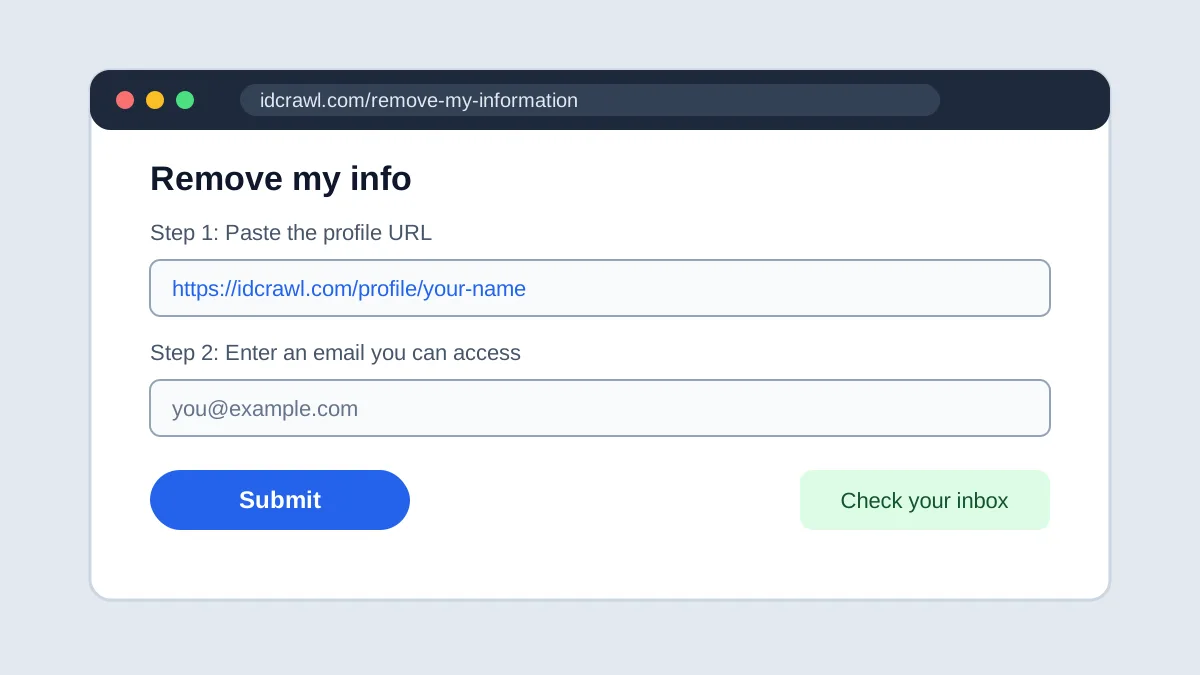
Go to idcrawl.com/remove-my-information. The IDCrawl site labels this page as "Remove my info."
Use the official address only. Copycat sites and sponsored ads sometimes claim to offer IDCrawl removal for a fee. Some of them collect more of your personal information than they need, which is the opposite of what you're trying to achieve.
Step 4: Enter your email and the profile URL
Enter the email address you can check, paste the profile URL, and complete any verification prompt. Some versions of the form include a CAPTCHA to confirm you're a person.
Provide only what the form asks for. You shouldn't need to send a Social Security number, a driver's license, or any other sensitive document to remove a profile. If anyone asks for those as a condition of removal, stop and verify the request through the official page.
Step 5: Click the verification link
IDCrawl sends an email with a link to finish the request. Open it promptly. If nothing arrives within a few minutes, check your spam or promotions folder.
If the email still doesn't arrive, submit the form again with the same address. If that doesn't work either, contact IDCrawl's support address, which is listed on its site as support@idcrawl.com. Include the exact profile URL in your message.
Step 6: Save your confirmation
Take a screenshot of the confirmation page and keep the verification email. If you need to follow up later, these show what you submitted and when.
Step 7: Recheck the listing
Search your name in a private or incognito browser window. Private browsing avoids saved results and personalized settings that could make a removed profile look like it's still visible.
If the profile is still showing after about two weeks, submit the request again with the same URL. Record each submission so you can prove what you sent.
Handling More Than One Profile
Many people find more than one IDCrawl profile. Each one may be a separate record, even if the information overlaps.
Keep a removal log
Create a simple table with four columns: profile URL, date submitted, confirmation saved (yes or no), and date rechecked. This keeps you from missing a profile or resubmitting one unnecessarily.
Treat name variations separately
If you use a nickname, a middle initial, or a maiden name, search each version. IDCrawl may index them as separate profiles, so an opt-out for one may not cover the others.
Decide which profiles matter most
If you can't handle everything at once, start with the profiles that show your phone number, home city, or family members. Those carry the most risk and are the most useful to scammers.
What the Opt-Out Covers and What It Doesn't
Understanding the limits of the opt-out helps you set realistic expectations and choose the right follow-up steps.
What it covers
- The IDCrawl profile page itself, once the request is processed
- Searches on IDCrawl for your name, since the profile should stop appearing there
What it doesn't cover
- The original social media profile or post that IDCrawl indexed
- Other people-search sites, which run their own systems
- Data brokers and marketers that may already hold copies of similar information
- Calls and texts already generated by lists sold before your opt-out
The right way to think about it is that the opt-out cleans up one searchable surface. The other surfaces need their own attention.
Why an IDCrawl Listing Can Come Back
Opt-outs are not always permanent. Several things can bring a profile back:
- New public content can be indexed again, such as a new post, a new public profile, or an updated record
- Original profiles stay visible if you haven't changed their privacy settings
- Usernames tie your accounts together. If you use the same handle across platforms, IDCrawl can connect the pieces
- Other services repopulate. Data moves between sites, so a removal on one doesn't stop a copy from showing up elsewhere
For these reasons, schedule a recheck every few months, and again after you change jobs, move, or start a new public account.
Cleaning Up the Sources Your Information Comes From
The opt-out deals with the output. To address the input, you need to look at where the information came from.
Find the original sources
Search your name in quotation marks on a regular search engine. Look at social platforms, forums, professional directories, and community websites. Note any page that shows your information.
Ask site owners to remove or update content
If a page you don't control includes your information, contact the site owner. Explain what's on the page and ask them to remove or edit it. Many websites and platforms have their own forms for personal information requests.
Use search engine removal tools
If a page has already been removed from its source but still appears in search results, you can ask search engines to refresh their index. Google and Bing offer tools for removing or updating outdated personal content. Use the official tool for your search engine when you're trying to speed up removal.
Securing Your Social Media Footprint
Social media is one of the biggest sources of profile data. A few changes can cut down how much IDCrawl has to work with.
Review privacy settings on every platform
Go through each social account you use, and check who can see your profile, your friends or followers lists, your posts, and your photos. Set the most restrictive option that still fits how you use the platform.
Remove accounts you no longer use
Dormant accounts are easy to forget, and they often still carry your name, photos, and location history. Close the ones you don't need. Deleting them is more reliable than leaving them public.
Watch your usernames
If you use the same username everywhere, a person or a people-search engine can link your accounts together. Consider using different handles for different purposes, especially for accounts you want kept separate.
Be careful with what you post
Avoid posting your phone number, home address, or a schedule that reveals when you're away. Public posts about family members can also expose information about people who never agreed to be online.
What to Do About Calls and Texts
An IDCrawl opt-out helps with search visibility. It doesn't stop phone lists that were built and sold before your opt-out. Those lists can keep generating calls and texts for months.
Here's a practical sequence:
- Register your number on the National Do Not Call Registry at donotcall.gov. Legitimate telemarketers are required to honor the registration. Scammers usually ignore it.
- Report unwanted calls to the Federal Trade Commission at ReportFraud.ftc.gov. Complaints help enforcement agencies spot patterns.
- Forward spam texts to 7726 so your carrier can identify and block the sender.
- Turn on your carrier's spam filter if your plan includes one.
- Use a call-screening app like CallCurb. CallCurb analyzes how calls behave, not only which numbers appear on known-bad lists, so it can flag newer spam numbers before they ring.
It's important to be clear about what CallCurb does and doesn't do. CallCurb screens and blocks calls on your phone. It does not remove your listing from IDCrawl or any other people-search site, and it doesn't clean up the social profiles where information originated. Those steps are covered in this guide. Together, the opt-out and call screening address both the searchable listing and the calls it may have helped generate.
Many people who opt out of IDCrawl are also dealing with specific types of calls. If your calls are about Medicare plans, read our guide on how to block Medicare calls in 2026. If the calls are offering loans, see how to stop spam calls from loan companies. If the calls mention a health clinic you don't recognize, our article on Infinity Health Clinic calls explains how to verify them before you share anything.
For a clear explanation of what the different spam labels on your phone mean, read our guide on what does spam call mean. For a related opt-out example, see our TruthFinder opt-out guide.
Extra Options for California Residents
California residents have an additional tool. The state's Delete Act created a registry of data brokers and a platform called DROP, the Delete Request and Opt-out Platform. Residents can use DROP to send one deletion request to every registered data broker at once, rather than submitting each request separately.
The registry covers registered data brokers, so some sites may fall outside it. Still, DROP is a useful way for California residents to clear multiple listings efficiently. Check California's official privacy resources for the current process, since program details can change.
A Recheck Schedule You Can Actually Follow
Many people opt out once and forget about it. A short recurring schedule keeps your results from quietly reverting.
- Day 0: Submit the request and save the confirmation
- Days 2 to 4: Confirm you clicked the verification link
- About day 7: Search your name in a private browser window
- About day 14: If the profile remains, resubmit and record the date
- Every three months: Search your name again and check for new profiles
- After any major change: Recheck after a move, a job change, a new public account, or a new phone number
Put these dates in your calendar. A few minutes every quarter is far easier than dealing with a profile that quietly reappeared months later.
Common Mistakes to Avoid
Several errors come up repeatedly when people try to opt out of people-search sites.
- Using a search results URL instead of the profile URL. The form needs the specific page that shows your information.
- Skipping the verification email. The request isn't finished until you click the link.
- Paying a third-party service without checking. The official removal process is free, and some paid services are unnecessary or unreliable.
- Sending sensitive documents. You shouldn't need a Social Security number or ID to remove a profile.
- Assuming one opt-out covers everything. IDCrawl, other people-search sites, and the original sources each need their own attention.
- Forgetting to recheck. Profiles can return, so set reminders.
Frequently Asked Questions
How do I remove myself from IDCrawl?
Search your name on idcrawl.com, copy the exact URL of the profile that lists you, and submit it along with an email address at idcrawl.com/remove-my-information. Click the verification link that IDCrawl sends to finish the request.
Is the IDCrawl opt-out free?
Yes. The official removal page doesn't charge a fee. Be cautious of third-party services that ask you to pay for something you can do yourself through the official form.
How long does IDCrawl removal take?
IDCrawl doesn't publish a fixed timeframe. Check your listing after a few days and again after about two weeks. If it's still visible, resubmit the request and keep a record of your submissions.
Do I need to send ID to remove my IDCrawl listing?
The official process asks for your email address and the profile URL. You generally shouldn't need to send a Social Security number or a government ID. If someone asks for sensitive documents as a condition of removal, stop and check the request through the official page first.
Will removing my IDCrawl listing also delete my social media profile?
No. Removing the IDCrawl page doesn't delete the social profile or public post it came from. To remove that content, you have to adjust its privacy settings or delete it on the platform itself.
Can I opt out by email instead of using the form?
IDCrawl lists support@idcrawl.com as a contact for help with the process. The official form is the most direct route. If you email support, include the exact profile URL and a clear statement that you're requesting removal of your personal information.
What if my information shows up again?
Submit a new request using the current profile URL. Then check whether the new listing comes from a new public source, and address that source directly if you can.
Does IDCrawl removal stop spam calls?
Not directly. An opt-out affects the IDCrawl page. Spam calls usually come from lists compiled and sold separately. Registering with the Do Not Call Registry and using a call-screening app such as CallCurb helps with the calls themselves.
Should I opt out of other people-search sites too?
Yes, if they list you. IDCrawl is one of many similar services, and each one may need its own request. Start with the sites that appear when you search your own name.
Can someone else request removal of my IDCrawl profile for me?
Some privacy services offer to submit requests on your behalf. Be careful, because you'd be sharing personal details with a third party. If you use one, research its reputation and read its privacy policy first. Doing it yourself is free and usually takes only a few minutes.
Why does my profile show a different city or old details?
People-search profiles often mix current and outdated information from different sources. Removing the profile stops it from appearing on IDCrawl, but the outdated details may still exist at their original sources. Check those sources if you want the information fully corrected.
Does a profile removal protect me from identity theft?
Not on its own. Reducing how easily your details are found helps with privacy, but identity protection requires separate steps. Consider a credit freeze with Equifax, Experian, and TransUnion, use strong unique passwords, and review your statements regularly.
How often should I check my IDCrawl profile?
Every three months is a reasonable schedule for most people. Check sooner after a move, a job change, a new public account, or a change in phone number.
Can I remove information that was posted by someone else?
Often yes, but it takes more work. Contact the website or platform where the content appears and explain why you want it removed. Many platforms have forms specifically for personal information requests, and some will remove content that identifies a private person.
Does CallCurb remove my profile from IDCrawl?
No. CallCurb is a call-screening app. It screens and blocks calls on your phone. It doesn't remove your listing from IDCrawl or other people-search sites. The opt-out steps in this guide handle the listing, and CallCurb handles the calls.
The Bottom Line
Opting out of IDCrawl is free and takes a few minutes once you have your profile URL and an email address you can check. Submit the request at the official page, click the verification link, and recheck your listing after several days.
The opt-out handles the IDCrawl page itself. The original social profiles and public sources need separate attention, and the calls that follow your information need their own defense. A call-screening app like CallCurb helps keep unwanted calls from reaching you while the rest of your cleanup takes effect.
Get started with CallCurb: